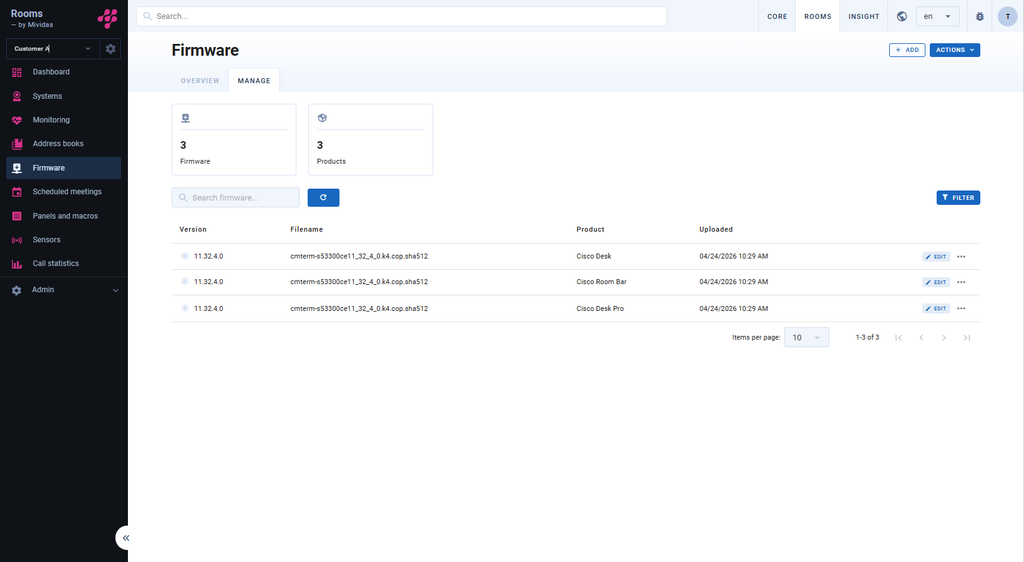
| Page actions | |
|---|---|
| Upload firmware. | |
| Update (
) – Allows you to manually update the current page. Documentation ( ) – Takes you to the relevant documentation. |


| Page actions | |
|---|---|
| ADD | Upload firmware. |
| Actions | Update (
) – Allows you to manually update the current page. Documentation ( ) – Takes you to the relevant documentation. |
| Option | Description |
|---|---|
![]() | Displays the total number of uploaded firmware’s. |
![]() | Displays the total number of products. |
| Allows you to search for a specific firmware. | |
| Manually reloads the page. | |
| Filter | Allows you to filter the firmware based on product. |

| Option | Description |
|---|---|
| Version | Displays the version. |
| Filename | Displays the file name of the firmware. |
| Product | Displays what product group it is for. |
| Uploaded | Displays the date and time of when the firmware was uploaded to the system. |
| Edit | Allows you to edit the settings of the selected firmware. |
| Allows you to choose: Download – Download the selected firmware. Copy – Copy the selected firmware. Remove – Delete the selected firmware. |